
Your Health, Wherever You Are
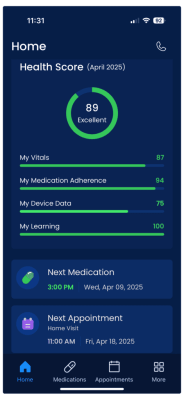
The Clinic@Home Mobile App brings the power of healthcare into the palm of your hand. Whether you're using iOS or Android, you can access the same trusted features you’ve come to rely on from the Clinic@Home TV App—now on the go.
Key Features
- Medication Reminders & Tracking
Stay on top of your treatment plan with built-in medication support. View your current medications, see when they’re scheduled, and mark them as taken—helping you stay consistent and on track. - Easy Access to Care
Connect with your care team and review upcoming appointments. Meet providers for video appointments (telehealth) from your device. - Health Device Readings
View readings from Clinic@Home connected health devices at any time or place. Use your blood pressure monitor to collect readings on the go. - Educational Content
Watch video content curated just for you—just like on the TV App.


Steps to Access for Active Clients
- Download the Clinic@Home Mobile App from the Apple App Store or Google Play Store on your smartphone.
- On the login screen, provide the email shared with your Clinic@Home care team. You will receive an email with a temporary six-digit passcode to enter into the Clinic@Home Mobile App to complete your login process. The passcode will only be active for five minutes to protect your account.